
7 days free, no card needed

One home base for the whole family.

Homebase by Perspective Box brings school timetables, practices, tests, doctor appointments, chores, meals, shopping and household bills into one place every adult can see. Each child gets a private link to their own day. One price for the whole household.

Try everything free for 7 days. No card needed. After 7 days the household pauses until the owner chooses a plan. Nothing is deleted. The trial includes about 10 AI imports. Then €4 a month or €40 a year for the whole household, VAT included.

A calmer home, shared fairly.

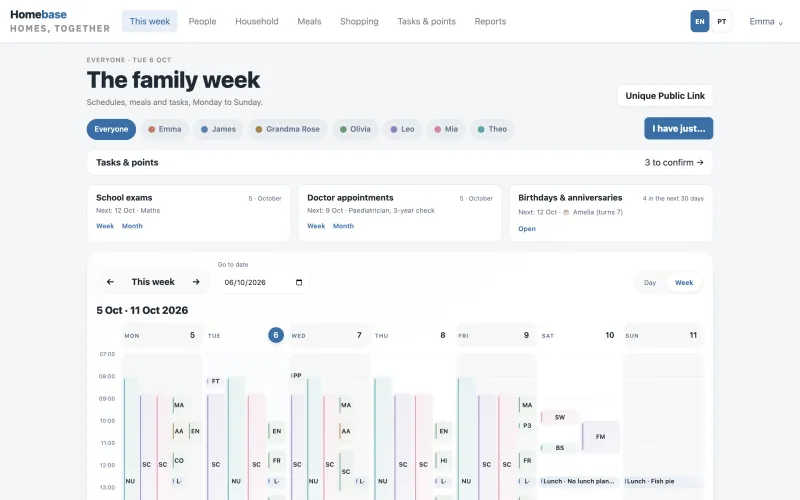
The family week in Homebase: a filter for each person, tasks waiting to be confirmed, the next school exam, doctor appointment and birthday, above the week's calendar.

Why Homebase

Every family needs a home base.

A home base is the one place everyone comes back to and checks in with. Today a big family's home base is one parent's head, a group chat and the fridge door.

  • Every timetable, every practice.

    A school timetable for each child, then football, swimming and music on top, each on its own days and times.

  • Tests, check ups and kit.

    The maths test next week, the dentist on Thursday, the football boots that need packing for Saturday.

  • Dinner for six, and whose turn it is.

    What to cook, what to buy for however many are eating, and who sets the table tonight.

  • Bills, and more than one home.

    Electricity, water and gas, receipts and costs, sometimes for a second house as well.

Homebase moves all of it into one place every adult can see and every child can open: who is where, who has a test, who cooks, who sets the table, what is due. When the plan lives in one place, the work stops living in one person.

Features

Everything the household runs on, in one family week.

School, practices, tests, appointments, jobs, meals and bills, for every person and every home.

The family week

The whole family's week, side by side.

See who is where today and this week. On a computer, a weekly grid shows everyone at once; on a phone, one day with everyone side by side. Holidays and school breaks are shaded, and lunch and dinner show the meal and who sets the table.

  • Add it once. It repeats every week. Classes and activities with days, times and place fill every week by themselves.
  • No school run on a day without school. Add the school breaks once and school classes pause on those days. In Portugal, the national public holidays are already built in.
  • A reminder for anyone, on the day you choose. Set it with a date and an optional time, and it shows on the calendar.
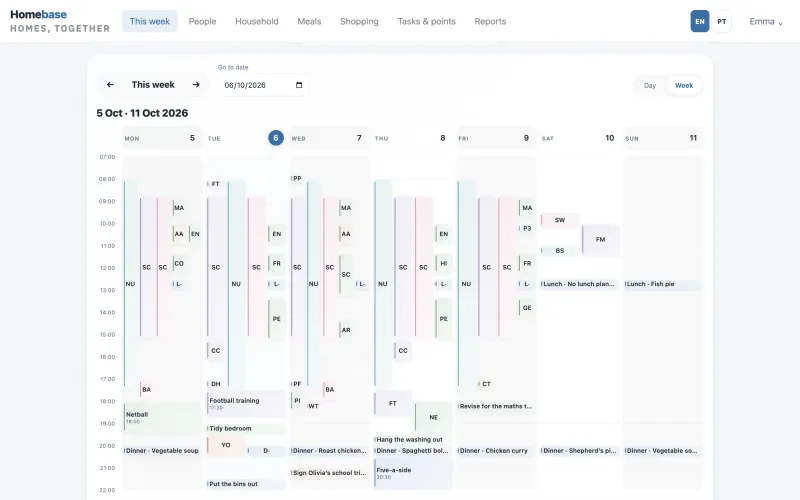
The Homebase week view from Monday to Sunday, with every person's school, activities, jobs and dinners in colour coded columns.
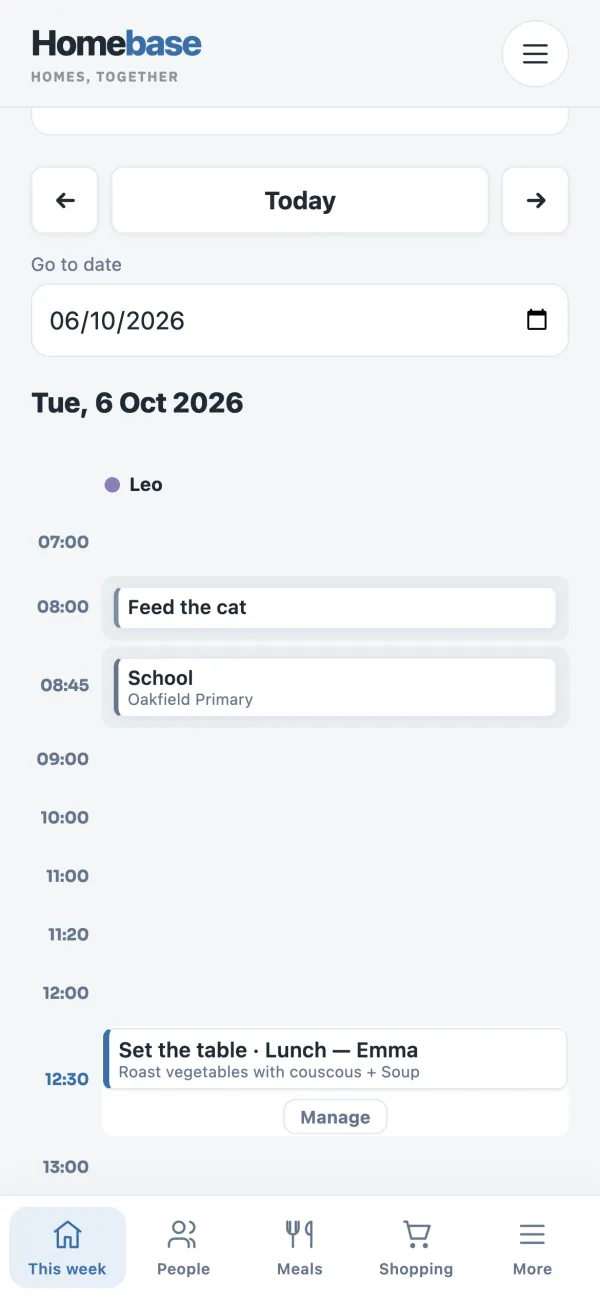
The family day on a phone: Leo's day hour by hour, with feeding the cat, school at Oakfield Primary, and lunch, where Emma sets the table.

School timetables

The school timetable, without the typing.

Upload a photo or PDF of the timetable. AI reads every lesson, you check and edit what was read, then save. Your child's week is done, and it repeats every week.

  • AI reads the subject, day, times, room and teacher of each lesson.
  • Only what you confirm is saved, and the photo or PDF is not kept.
  • A clean start for the new school year. Clear a child's school timetable in one step. Activities, reminders, chores and test dates stay where they are.

Owners and admins can import. A monthly AI allowance applies on every plan.

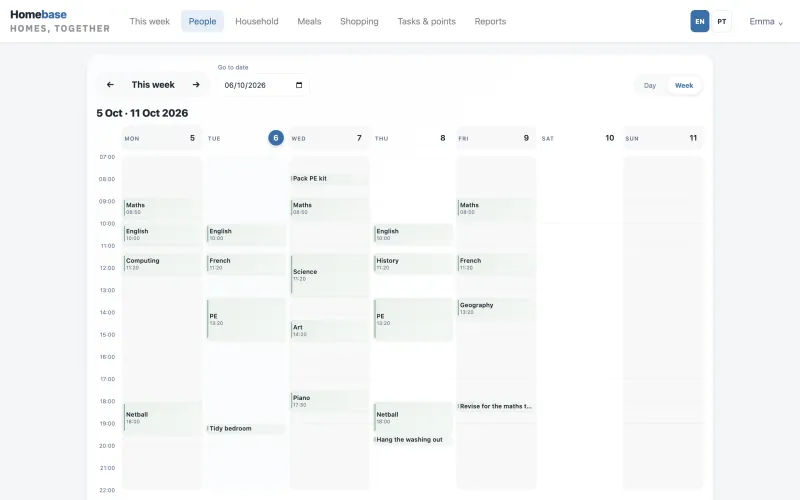
One child's school week in Homebase: maths, English, science, history and other lessons from Monday to Friday, with netball, piano and jobs in the evenings.
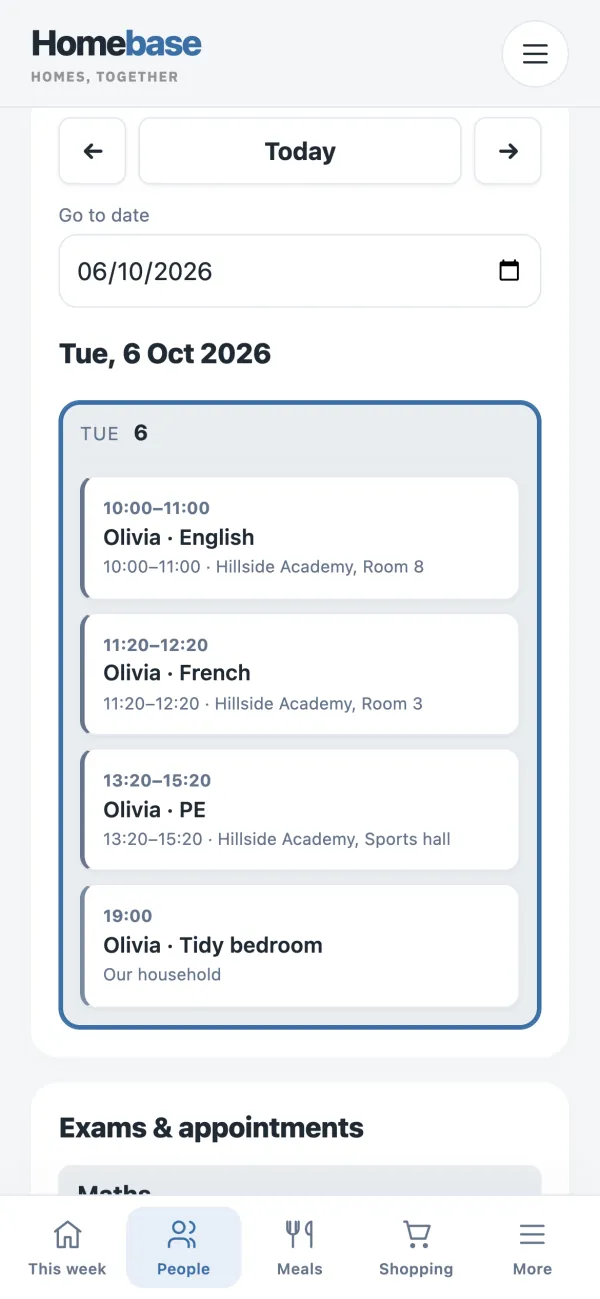
One child's school day on a phone: English, French and PE lessons with their times and rooms, then tidying her bedroom in the evening.

Tests, practices and appointments

Tests in the right lesson.

A school test sits in the real class it replaces, so revision can be planned and nobody is caught out.

  • Every practice in the same week as school. Football, swimming, music, gymnastics: add each club and practice for children and adults, with days, times and place.
  • Every check up in one place. Keep every doctor and dentist appointment for the whole family together, with week and month views and the next date at a glance.
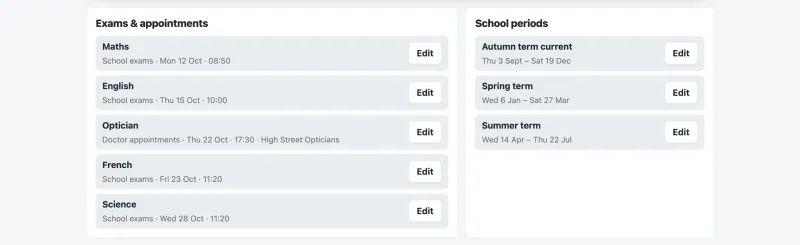
Exams and appointments for one child: maths, English, French and science tests with their dates and times, an optician appointment, and the school terms beside them.
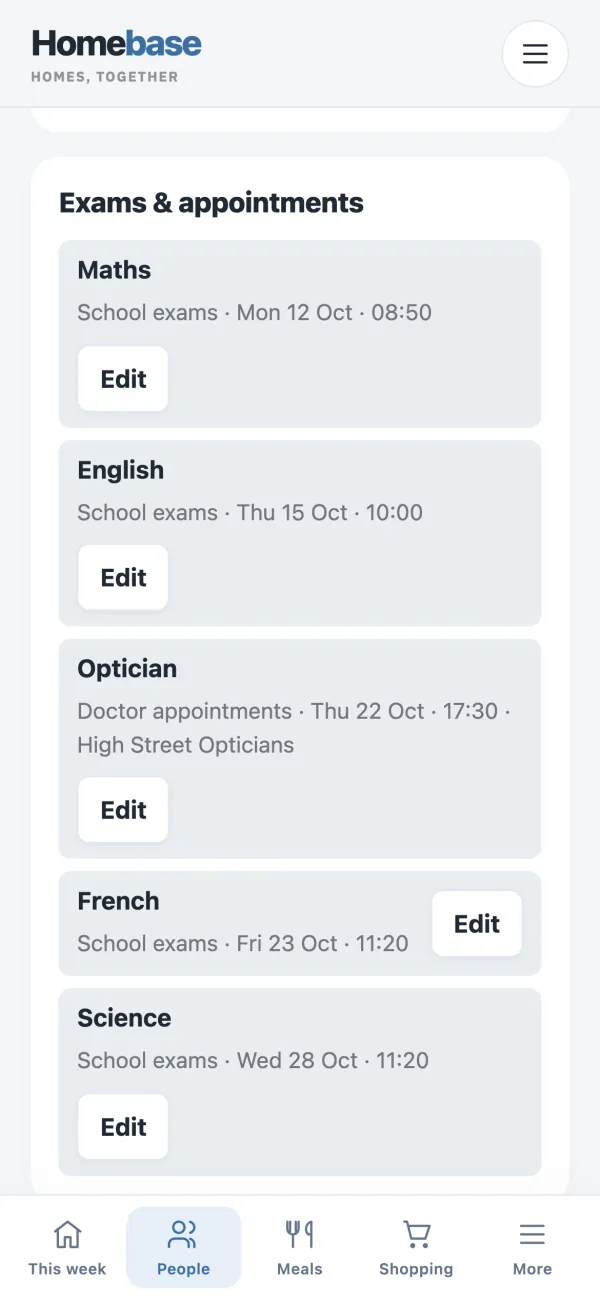
Exams and appointments on a phone: maths, English, French and science tests with their dates and times, and an optician appointment.

Table setting rota

Whose turn is it to set the table? Homebase already knows.

The rota rotates by itself for each home. Swap a day by hand, add or remove people, and put today's setter on a big screen.

  • Change the order, or take someone out of the rota and add them back later.
  • A day you change by hand stays as it is when the rota is rebuilt.
  • Today's setter shows on the family week, at lunch and dinner.
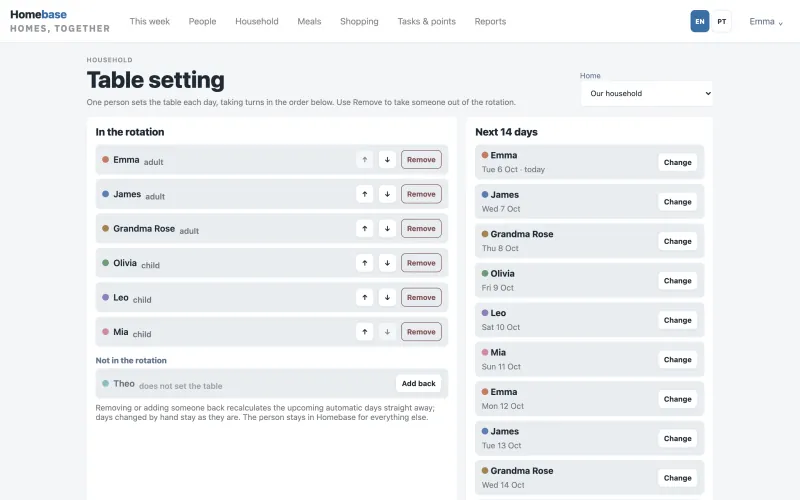
The table setting rota: six family members in turn order with buttons to move or remove them, and the next 14 days showing who sets the table each day.
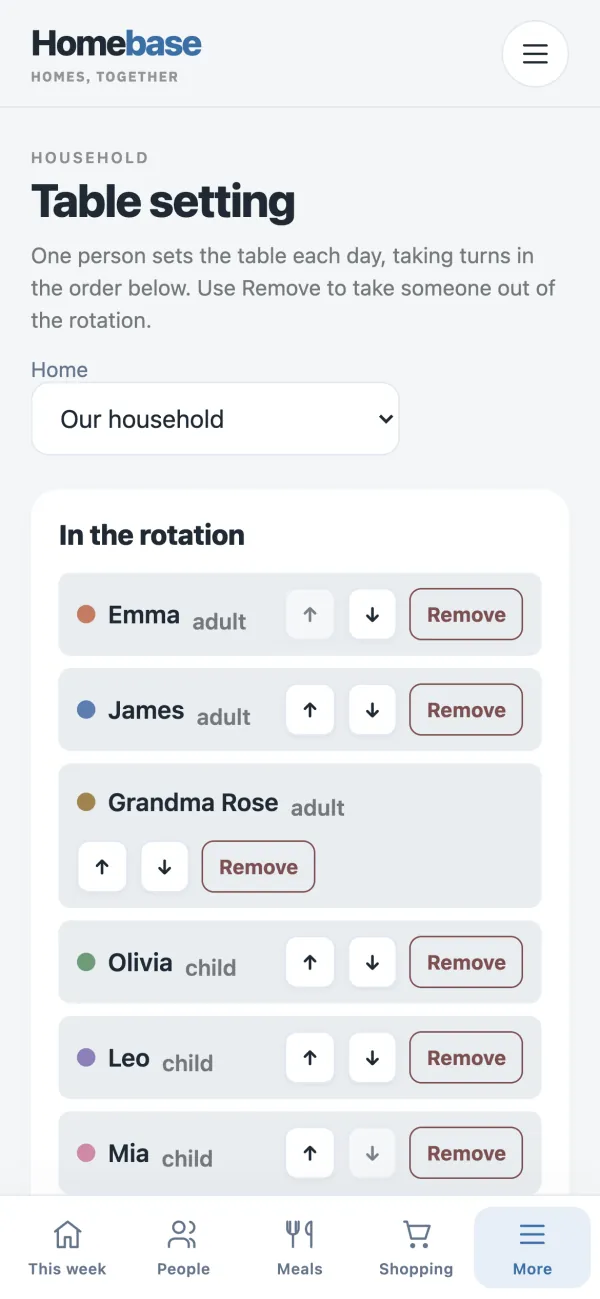
The table setting rota on a phone: six family members in turn order, with buttons to move or remove each one.

Chores and points

Points for real help, confirmed by an adult.

Children earn points for jobs an adult has confirmed. Everyone can see them grow. Points add up. Your family decides what they are worth.

  • Everyone's jobs, at every home. Give each person their jobs, with a date and a time, at home or at the holiday house.
  • Children report jobs done from their own link, and an adult confirms them.
  • Share out the cleaning, room by room. Plan cleaning jobs for each home, with a room, a person and a date.
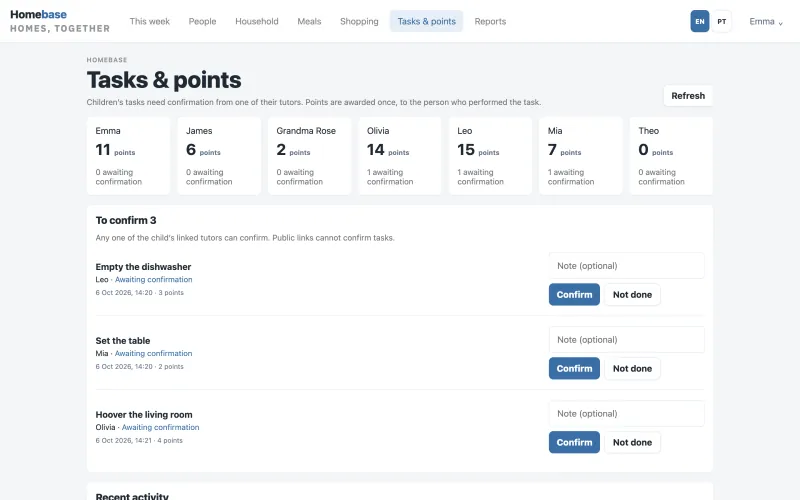
Tasks and points: each family member's points, and three children's jobs, emptying the dishwasher, setting the table and hoovering, waiting for an adult to confirm.
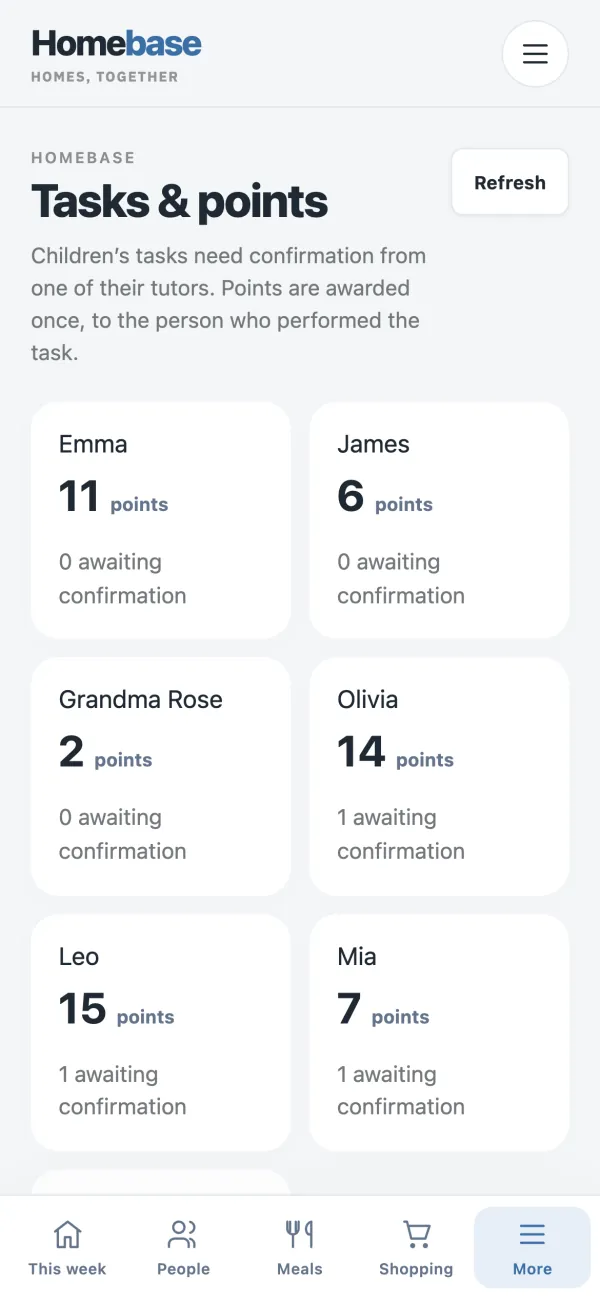
Tasks and points on a phone: each family member's points and how many of their jobs are waiting for an adult to confirm.

Meals, recipes and shopping

The shopping list that writes itself.

Plan lunch and dinner for each day, for however many are eating. Your shopping list builds itself from the meal plan, scaled to how many are eating, merged into one row per ingredient.

  • The week's meals, decided in one sitting. Fill empty days from your favourites.
  • Your family's favourite recipes, in one library. Search 25 popular recipe sites in six countries and keep the favourites, with a link back to the original.
  • Add your own items to the list, tick them off, print it.
  • Know what you are short of. Keep track of what is in the cupboard and see what you need for the week's meals.
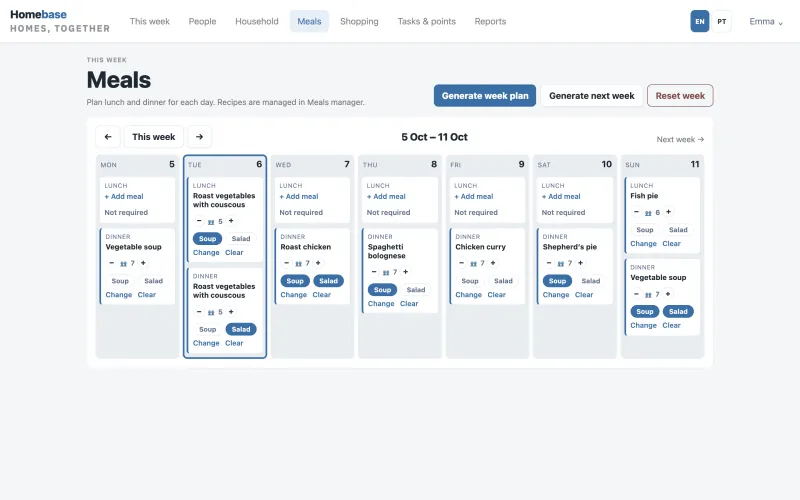
The week's meal plan: lunch and dinner for each day, such as roast chicken, chicken curry and fish pie, with the number of people eating and soup and salad options.
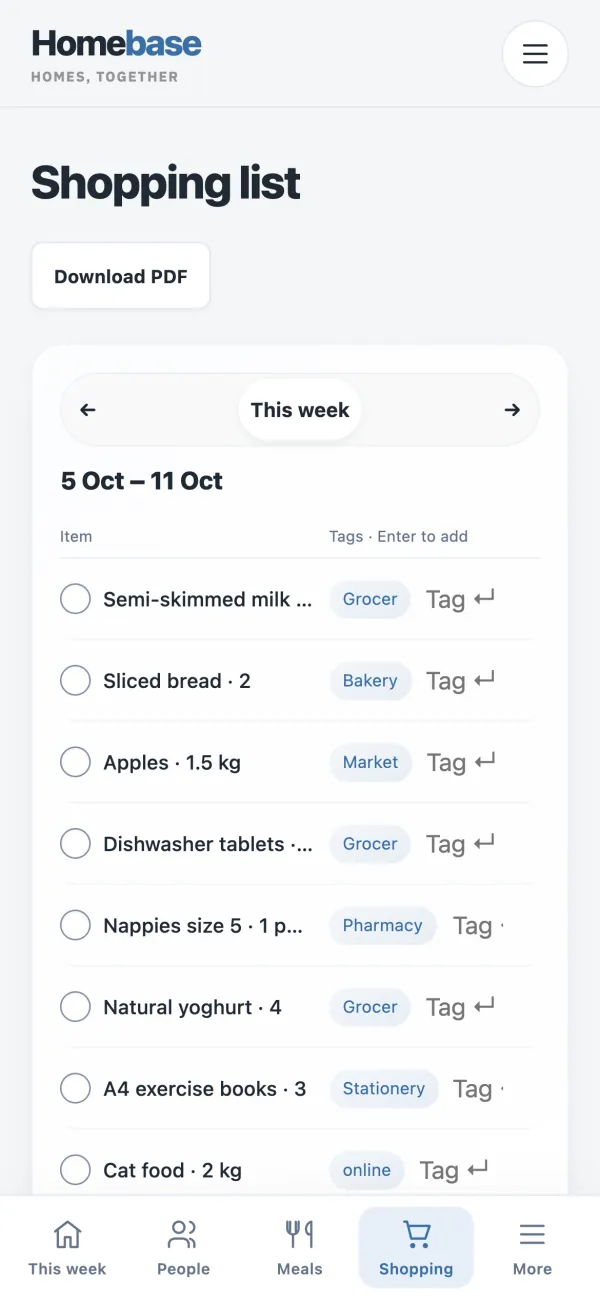
The shopping list on a phone: milk, bread, apples, yoghurt and other items, each tagged with the shop to buy it from.

Bills, expenses and costs

Every bill, read for you to check.

Upload a utility bill as a PDF or photo and Homebase reads the supplier, the due date, the usage and every charge. You check it before it is saved.

  • Log an expense from the receipt. Upload a photo or PDF of a receipt and Homebase reads the shop, the total and the items for you to confirm.
  • A year of household costs at a glance. See bills, usage and spending over the last 12 months, and spot the bill that keeps rising.
  • Finances stay with the adults who need them.

Amounts are shown in euros.

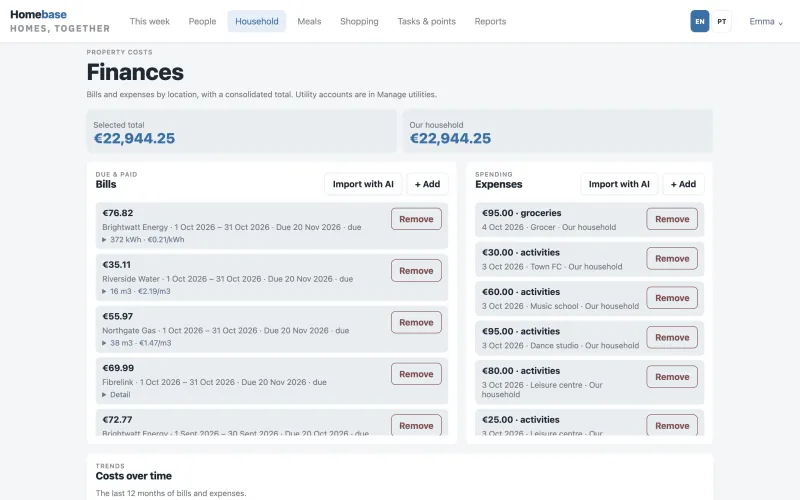
Household finances: the total, utility bills for electricity, water, gas and internet with usage and unit cost, recent expenses, and Import with AI buttons.
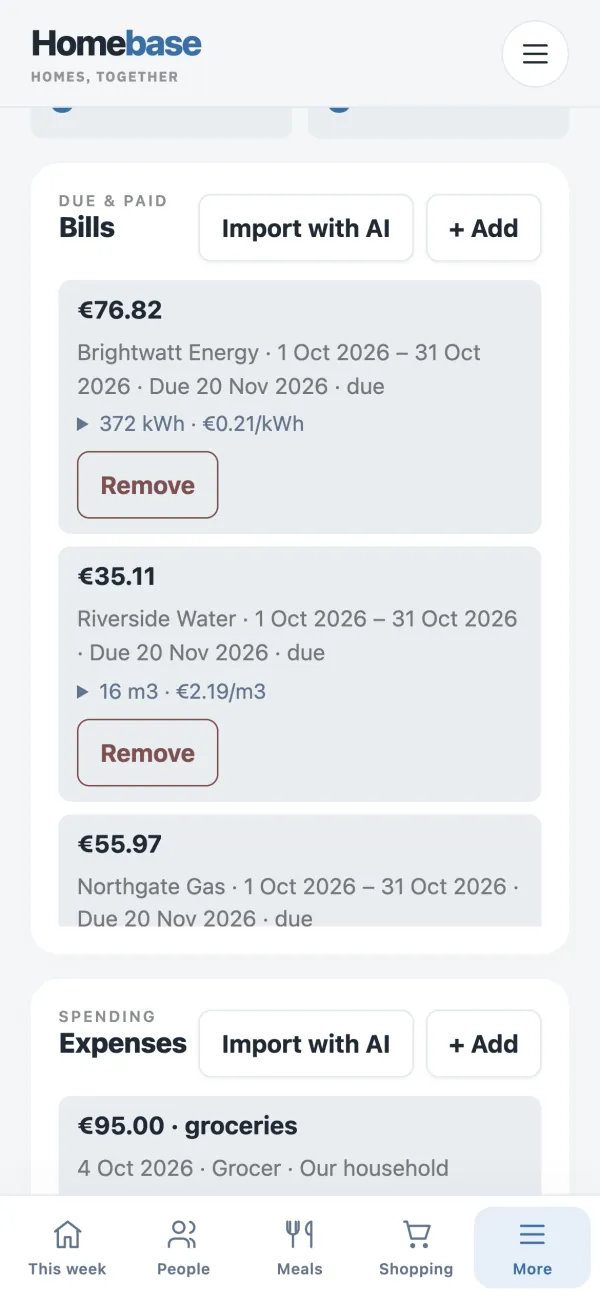
Bills and expenses on a phone: energy, water and gas bills with usage and due dates, a groceries expense, and Import with AI buttons.
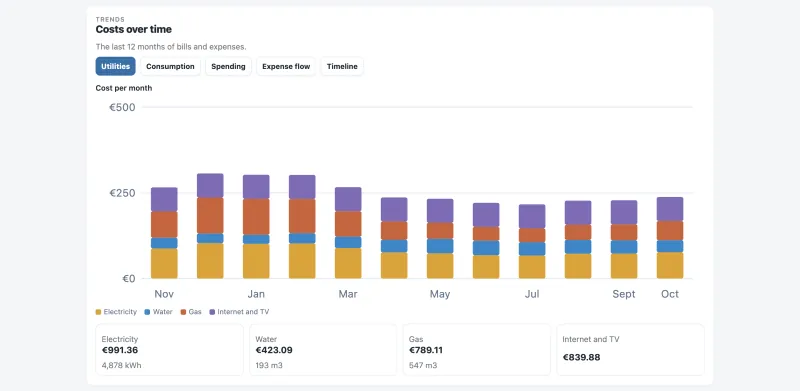
Costs over time: a bar chart of 12 months of utility costs, split into electricity, water, gas, and internet and TV, with a total for each.

Birthdays and anniversaries

Every birthday coming up, in sight.

See birthdays and anniversaries for the month ahead, including relatives who are not in the app.

  • Grandparents, godparents, cousins and friends, with the age they turn.
  • Anniversaries and memorials too, with the number of years.
  • Each one shows on its day in the family calendar.
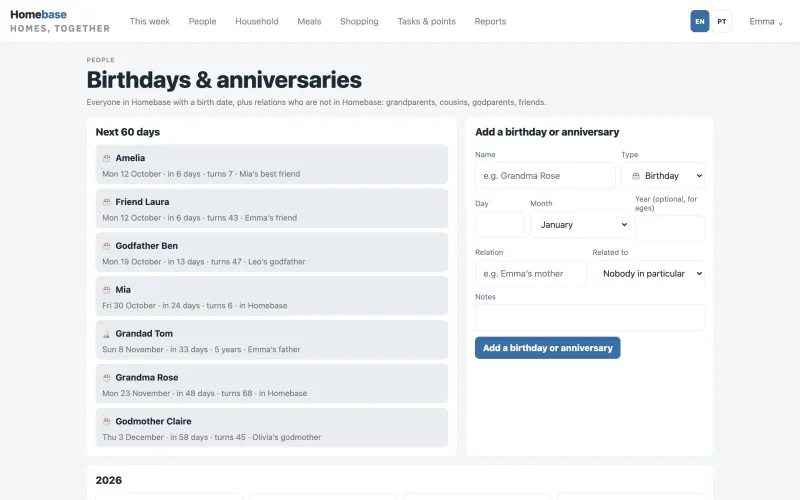
Birthdays and anniversaries for the next 60 days, with each person's age and relation to the family, beside a form to add a new one.
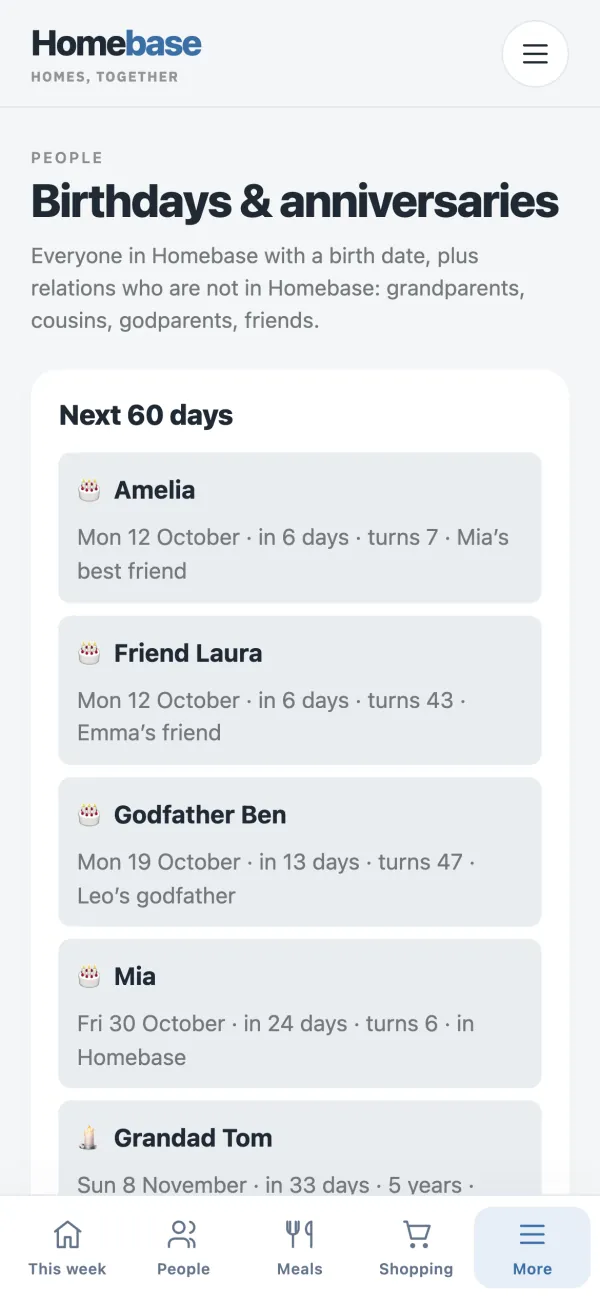
Birthdays and anniversaries on a phone: the next 60 days, with the age each person turns and their relation to the family.

Children and the kitchen tablet

Each child's own day, on their own screen.

Each child gets a private link to their own schedule, jobs and points. No account, no password. You can switch a link off at any time.

  • Everyone in the family, no accounts needed. Add children, grandparents and carers as people in the household. They do not need an account or an email.
  • The family's day on the kitchen tablet. Turn a spare tablet into the family screen: today's plan for everyone, in day or week view.

Anyone with a private link can open it, so share each link only with the person it belongs to.

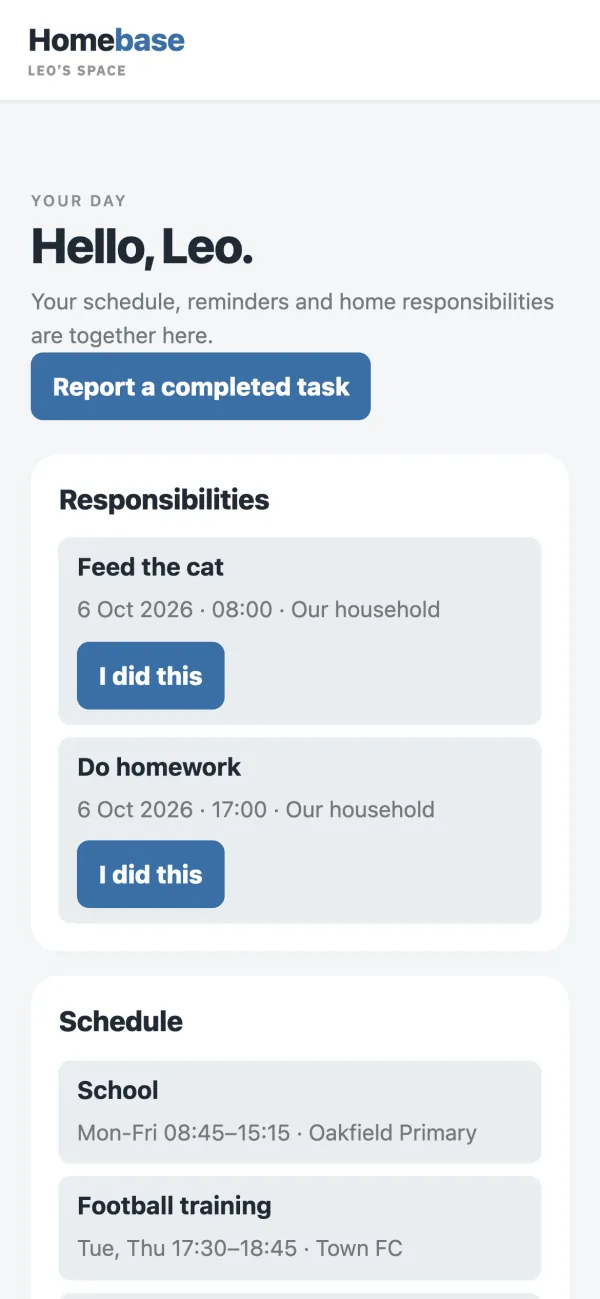
A child's own page on a phone: a greeting, a button to report a completed task, today's jobs with I did this buttons, and the week's school and football times.

Several homes

More than one home, one account.

Run the main house and the holiday house together, with cleaning, bills and costs kept apart and totals combined.

  • Each home has its own cleaning, table setting rota, bills and expenses.
  • All homes together shows the combined totals.
  • Meals, shopping and the cupboard are shared by all homes.
  • Belong to more than one household and switch between them, with one sign in.

Works with your AI assistant

Ask your AI assistant about the family week.

Connect Homebase to ChatGPT as a custom connector and ask what is on tomorrow or what you need from the shops. It reads only what you can already see in Homebase, and changes nothing.

  • What is on tomorrow?
  • What do we need from the shops?
  • Ask about the household, the schedule for up to 14 days, tests and appointments, the meal plan and the shopping list.
  • Each adult connects with their own Google account, and can disconnect at any time.

Homebase connects through MCP (Model Context Protocol). This needs ChatGPT's developer mode, so check your ChatGPT plan allows it.

Also in Homebase.

Share the running of the home.

Add the other adults with their Google account. Everyone sees the plan; finances stay with the adults who need them.

Homebase in the calendar you already use.

Subscribe to anyone's Homebase schedule, or everyone's, from Google Calendar, Apple Calendar or Outlook. View only; your calendar app refreshes it on its own timetable.

Bring in other calendars.

Add a calendar that offers an iCal link, such as a club or a work calendar, and see it next to the family plan.

Works in your browser, nothing to download.

Use Homebase on your phone, tablet or computer, and add it to your home screen.

Explore with a sample family first.

Load a complete sample family to try everything, then remove it in one click and add your own.

In English and European Portuguese.

Switch language on any screen. Each person also picks one of six colour themes, including a dark one, on their own device.

How it works

Your family's home base in three steps.

Start with a sample family to look around, or set up your own straight away.

  1. Create your household.

    Sign in with Google, name your household and choose your country. Your 7 day free trial starts at once, with every feature and no card.

  2. Add everyone.

    Add each person as an adult or a child. Children, grandparents and carers need no account. The table setting rota starts by itself.

  3. Fill the week.

    Upload each school timetable, check what was read and save. Add practices, tests, appointments, meals and jobs, then share each child's private link.

Pricing

One price for the whole household.

However many people. VAT included. No ads.

Billing period

Premium

Not on sale yet

€5a month

or €50 a year (12 months for the price of 10)

€50a year

12 months for the price of 10, or €5 a month

VAT included. Per household, however many people.

  • Everything in Standard
  • Ten times the monthly AI allowance, about 200 AI imports a month
  • For families who import a lot of timetables, bills and receipts

Premium is not on sale yet.

Try everything free for 7 days. No card needed.

Nothing is charged unless you choose a plan. After 7 days the household pauses until the owner chooses a plan. Nothing is deleted. The trial includes about 10 AI imports.

Early access is open to a small number of families first. These are our prices at launch, VAT included. If they ever change, the terms give 30 days' notice. Prices are in euros. See the terms.

Privacy and data

Kept in the family.

What we do with your household's information, in plain words.

Stored in the EU.

Your household data is stored in the EU, in Frankfurt.

Kept separate.

Each household's data is kept separate at database level, and our team's admin tools show account figures, not your family's content.

AI imports, then discarded.

To read a timetable, bill or receipt, the file is sent to our AI provider, Anthropic, in the United States. Only what you confirm is saved, and the photo or PDF is not kept.

No advertising or tracking cookies.

Homebase shows no ads and uses no advertising or tracking cookies. This website sets no cookies at all.

Services outside the EU.

Some services we use are outside the EU, such as Google sign in, payments, the AI provider and any assistant you connect. The privacy policy lists them.

Your data, on request.

Edit or delete any entry yourself. Ask us for a full export, or to close the household, and we answer within 30 days.

Questions

Questions, answered.

What is Homebase?

Homebase by Perspective Box is a household manager for busy families. It brings school timetables, practices, tests, doctor appointments, reminders, chores, meals, shopping and household bills into one place every adult in the family can see.

Who makes Homebase?

Perspective Box, an information systems company based in Lisbon and London, working since 2013 and now building its own software.

How much does it cost?

Standard is €4 a month or €40 a year, VAT included. Premium is €5 a month or €50 a year, VAT included, with ten times the AI allowance; it is not on sale yet. Both are one price per household, however many people.

Is the trial really free?

Yes. You get every feature for 7 days and no card is needed. Nothing is charged unless the owner chooses a plan. After 7 days the household pauses until then, and nothing is deleted.

Do my children need an account or an email?

No. Children, grandparents and carers can be added as people without an account. Each child can have a private link to their own day, jobs and points. Anyone with the link can open it, so share it only with that child, and switch it off at any time.

Who can sign in?

Adults sign in with a Google account. The owner adds other adults by their Google email as an admin or a member. No invitation email is sent, so tell them to sign in. Admins manage settings, finance and AI imports; members see schedules, manage shopping and report jobs.

How does the AI import work, and what happens to my files?

Owners and admins upload a photo or PDF of a school timetable, a utility bill or a receipt. AI reads it and shows you the result to check and edit; only what you confirm is saved. The file is not kept. To read it, the file is sent to our AI provider, Anthropic, in the United States. A monthly allowance applies: about 10 imports in the trial, about 20 a month on Standard and about 200 on Premium.

Can I use Homebase from my AI assistant?

Yes, for reading. Homebase connects to ChatGPT as a custom connector through MCP (this needs ChatGPT's developer mode, so check your ChatGPT plan allows it). You can ask about the household, the schedule for up to 14 days, tests and appointments, the meal plan and the shopping list. It cannot add or change anything, and it only sees what you can already see.

Does it work on my phone?

Homebase is a web app. It works in the browser on phones, tablets and computers, and can be added to your home screen. There is no App Store or Google Play app, and it needs an internet connection.

Which languages and countries does it suit?

Homebase is in British English and European Portuguese. Portuguese national holidays are built in; elsewhere you add your school breaks once. Prices and amounts are shown in euros.

Does it sync with Google Calendar, Apple Calendar or Outlook?

You can subscribe to anyone's Homebase schedule from those apps, and bring other calendars with an iCal link into Homebase. Both are one way and view only, and calendar apps refresh subscriptions on their own timetable, which can take hours.

Are there rewards for the points?

Points add up. Your family decides what they are worth. Children earn points for jobs an adult has confirmed; there is no reward shop in the app.

Where is my data, and can I take it with me?

Your household data is stored in the EU, in Frankfurt, and kept separate from every other household. Some services we use are outside the EU, such as Google sign in, payments, the AI provider and any assistant you connect; the privacy policy lists them. There are no advertising or tracking cookies. You can edit or delete any entry, and ask us for a full export or to close the household; we answer within 30 days.

Give your family one home base.

Try everything free for 7 days. No card needed. Then €4 a month or €40 a year for the whole household, VAT included.

After 7 days the household pauses until the owner chooses a plan. Nothing is deleted. The trial includes about 10 AI imports.

A calmer home, shared fairly.